
Reliable troubleshooting tool for HP devices
HP Print and Scan Doctor is an IT tool that quickly diagnoses and resolves common HP printing and scanning issues. With a focus on speed and accessibility, it handles connectivity checks, driver updates, and error detection, providing an efficient solution for home and office users needing fast printer support.
Top Recommended Alternative

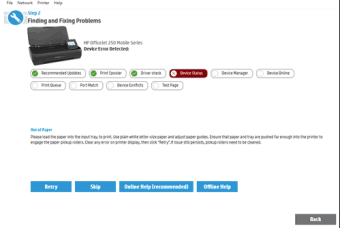
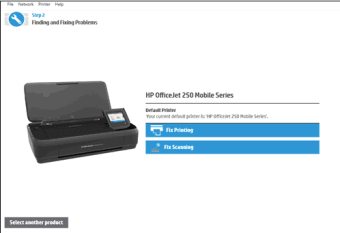
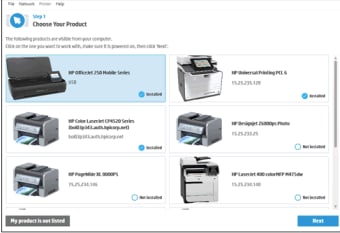
It stands out with its intuitive interface and guided repair process. HP Print and Scan Doctor leads users through step-by-step diagnostics, including network checks and print queue clearing. By emphasizing usability and automated fixes, the tool helps individuals and small businesses resolve issues without manuals or extended troubleshooting searches.
Features, usability, and performance insights
The program’s biggest strength lies in its comprehensive diagnostics, which cover printing, scanning, and device connectivity. It automatically detects driver issues, network problems, and other common faults, providing clear instructions to fix them. While HP Print and Scan Doctor excels in ease of use, it may not address extremely rare hardware failures, requiring professional repair. Its balance of automation and guidance ensures that even non-technical users can troubleshoot effectively.
From a usability perspective, the tool offers a clean interface with simple navigation and clear prompts. Users can initiate scans and fixes with minimal clicks, and real-time feedback enhances confidence. However, large organizations with multiple HP devices may find their single-device focus limiting. The program is best suited for casual users, small offices, or remote troubleshooting, prioritizing speed and simplicity over advanced network management features.
Performance is generally stable, with rapid detection of issues and smooth execution of repair routines. It integrates with Windows seamlessly, although scanning fixes on older models may take longer. Compared to other printer troubleshooting tools, the program emphasizes clarity and guidance, allowing users to resolve the most common issues independently, making it a reliable companion for everyday HP device maintenance.
Trusted tool for HP troubleshooting
HP Print and Scan Doctor provides a reliable and intuitive solution for troubleshooting common printing and scanning issues. Its step-by-step diagnostics, guided repair instructions, and fast execution make it particularly useful for home users and small office environments. While it cannot replace professional repair for hardware failures, the program remains a practical and essential tool for maintaining HP devices, ensuring consistent performance and minimizing workflow disruptions.


.png)


.png)